
本页目录
这是一段为客户写的美化 CSS,但是在测试网站好像出了问题,怪怪的,在此仅做记录,方便后续开发维护。
想使用的同志可以自己调整下,如果后续喜欢的比较多,我就再优化下。
示例
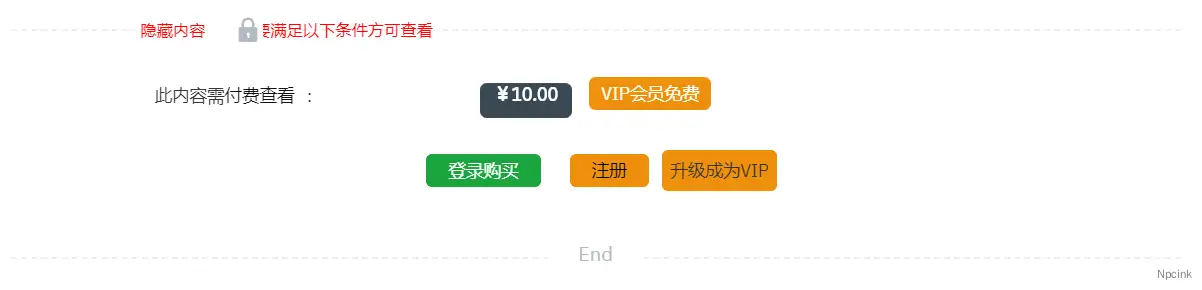
CSS
/*Npcink*//*标志*/.content-hidden-before i { left: -12em; padding: 0 0 0 20px;
}
/*说明文本*/.content-hidden-info-title { margin-top: 0px!important; top: -1em; position: absolute; left: 8em; color: red;}
/*介绍文本与价格对齐*/.content-cap-title { position: absolute; left:7.2em;}
.content-cap-title:before { content:'此内容需'; font-size: 14px;}
.content-cap-title:after { content:':'; font-size: 14px;}
.content-cap-title span { color: #111; font-size: 14px; padding: 0 10px 0 0;}
/*价格文本*/.content-user-money span { color: #fff; background-color: #3A4954; border: 1px solid #3A4954; line-height: 16px; border-radius: 5px;}
.content-user-money:after { content:'/';}.content-user-money:after { content:'VIP会员免费'; background-color: #EF900C; border-radius: 5px; border: 1px solid #EF900C; padding: 0.01em 0.6em; margin-left: 1em; color: #fff; font-size: 14px;}
/*按钮*/.entry-content a { padding: 0.2em 1.2em; border-radius: 5px; font-size: 14px;}
/*第一个按钮*/.entry-content a:first-child { color: #fff; background-color: #1CA43E; border: 1px solid #1CA43E;}
/*第二个按钮*/.entry-content a:nth-of-type(2) { color: #000; background-color: #EF900C; border: 1px solid #EF900C;}
/*登录后*/.content-user-lv-login .content-cap-login { color: #fff; background-color: #1CA43E; border: 1px solid #1CA43E;}.content-user-lv-login .content-cap-login:after { content:'购买';}
.content-user-lv-login:after { content:'升级成为VIP'; background-color: #EF900C; border-radius: 5px; border: 1px solid #EF900C; padding: 6px 6px; font-size: 14px;}如何使用
在主题根目录下的 style.css 文件中的底部下添加以下代码并保存。