
本页目录
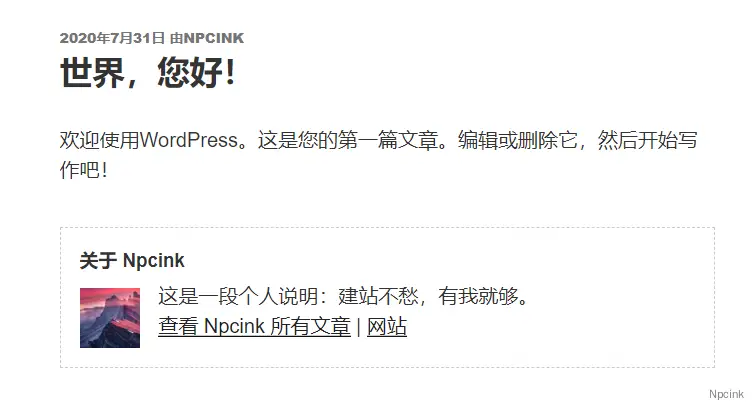
访客们都是来也匆匆,去也匆匆,为了给匆匆的访客们留下一个良好且深刻的印象,可以在文章的末尾自带添加一个作者信息框,进行一些简单的自我介绍。
- 原文来源:详情
代码部署
在主题根目录下的functions.php文件中的<?php下添加以下代码:
function wp_author_info_box( $content ) { global $post; // 检测文章与文章作者 if ( is_single() && isset( $post->post_author ) ) { // 获取作者名称 $display_name = get_the_author_meta( 'display_name', $post->post_author ); // 如果没有名称,使用昵称 if ( empty( $display_name ) ) $display_name = get_the_author_meta( 'nickname', $post->post_author ); // 作者的个人信息 $user_description = get_the_author_meta( 'user_description', $post->post_author ); // 获取作者的网站 $user_website = get_the_author_meta('url', $post->post_author); // 作者存档页面链接 $user_posts = get_author_posts_url( get_the_author_meta( 'ID' , $post->post_author)); if ( ! empty( $display_name ) ) $author_details = '<div class="author-name">关于 ' . $display_name . '</div>'; if ( ! empty( $user_description ) ) // 作者头像 $author_details .= '<div class="author-details">' . get_avatar( get_the_author_meta('user_email') , 90 ) . nl2br( $user_description ). '</div>'; $author_details .= '<div class="author-links"><a href="'. $user_posts .'">查看 ' . $display_name . ' 所有文章</a>'; // 检查作者在个人资料中是否填写了网站 if ( ! empty( $user_website ) ) { // 显示作者的网站链接 $author_details .= ' | <a href="' . $user_website .'" target="_blank" rel="nofollow">网站</a></div>'; } else { // 如果作者没有填写网站则不显示网站链接 $author_details .= '</div>'; } // 在文章后面添加作者信息 $content = $content . '<footer class="author-bio-section" >' . $author_details . '</footer>'; } return $content;}// 添加过滤器add_action( 'the_content', 'wp_author_info_box' );// 允许HTMLremove_filter('pre_user_description', 'wp_filter_kses');样式美化
在主题根目录下的 style.css 底部添加以下代码进行外观美化
.author-bio-section { background: #fff; float: left; width: 100%; margin: 10px 0; padding: 15px; border: 1px dashed #ccc;}.author-name { font-size: 15px; font-weight: bold; margin: 0 0 5px 0;}.author-details img { float: left; width: 48px; height: auto; margin: 5px 15px 0 0;}